Tuesday, 2 January 2018

How To Access Blocked Websites? 12 Easy Ways To Bypass Them


Short Bytes: Restrictions and bans over websites are always annoying, and governments are now censoring content more than ever. Check out the 10 easy ways to bypass the censorship to access blocked websites. These easy-to-use and effective methods include the use of VPN, extensions, DNS hack, proxy websites, and others.


Given the current stature of the constitutional “Rights” and “Freedoms” conferred upon the public in most of the democracies, censorship, and bans on trivial matters often come as a surprise. And in the era of the Internet, harassing the general public is even easier. Be it the controversial net neutrality, or restriction to access to specific websites.


If you also feel stifled by the blocked websites then here are some ways to access blocked websites:


How to access blocked websites — 12 useful methods!

1. Use VPN


VPN or Virtual Proxy Network allows you to connect your device to a secure connection to another network over the internet. VPN enables you to access blocked websites from your home network and puts your IP address in a land far away. You can also download the apps or open the sites blocked in your country.


VPN acts as a tunnel that converts your data into garbage value that’s difficult for anyone to sniff and recognize. There are tons of free/cheap VPN services that one can use and enjoy an uninterrupted internet experience.
Apart from just web blocker bypass, if you are into exploring ways to enhance your computer security, you can also go for the deadly combination of TOR and VPN.


Check out our detailed article on what is VPN and how it works . Here are some great VPN packages for you to try — https://techgyanmantra007.blogspot.in/2018/01/what-is-vpn-virtual-private-network-how.html?m=1

πŸ‘‰PIA (Private Internet Access)
πŸ‘‰ExpressVPN
πŸ‘‰IPVanish
πŸ‘‰X VPN
πŸ‘‰Hidemyip


2. Become Anonymous: Use Proxy Websites


Very often, in a professional environment, the employers draw certain boundaries, restricting your the access to some particular websites. At times, you need a way to access the blocked websites and in those situations, proxy websites act as a rescue method.

On the web, there are hundreds of proxy websites that make your web experience ‘unrestricted’. A proxy website becomes a moderator between the user and server site. The proxy website camouflages the blocked site from the ISPs and allows you to access blocked websites. To get a proxy website for any blocked site, just perform the Google search.

Eg: Facebook Proxy Server. In case, Facebook is blocked in your institution, or you can go to —

https://www.hidemyass.com/

http://www.spysurfing.com/

https://www.proxysites.com


3. Use IP Rather Than URL


The blocked website sometimes are stored as a list of URLs and using IP of the website might work in few of the cases. To get the IP address for any website, you do a ping domain.com command in Command Prompt. Using IP is a simple way to access blocked websites in your region. However, if the website had hidden its IP too, then it won’t open with this method.


All you need to do is run CMD on your computer. Now type “ping www.websitename.com” and press Enter. This will promptly return the IP address. Now enter this IP address in your web browser’s address bar and hit Enter to visit “access denied” websites.


4. Change Network Proxy In Browsers


Your college or institute might be having more than one proxy for its network. So, it happens that some websites are restricted on one proxy, but accessible in another. So, you can give a try to proxy surfing to access blocked websites in your college.


Disabling the network proxy settings in our web browsers isn’t a tough task. You just need to find the connections/network option in the settings of your web browser.

 There, you can select the no proxy option or use another one that’s providing unrestricted browsing at your institution.


5. Use Google Translate

Institutes or even countries sometimes don’t ban Google Translate. So, you can bypass the restriction by converting the blocked website into some other language that you may know. Try Google Translate and see for yourself. It is yet another simple way to access blocked websites.


You can also use Microsoft’s Bing translation service to unblock a banned website. To unblock websites at school and office, there are other translation services available as well.


6. Bypass via Extensions

If the websites that are blocked by your institute or office are dynamic in nature such as Facebook or YouTube, then you should give a try to these extensions. Hola and ProxMate are some extensions that you can use to access blocked websites.


7. URL recasting

There are instances when a particular website is hosted in VPN and it doesn’t have a verified SSL installed. For such websites, you can simply go to the address bar of your web browser and try typing https://www.url.com, instead of accessing www.url.com or http://www.url.com. This change might display a security notice. Press on the Proceed Anyway option and visit the website.


8. Replace your DNS Server

We’ve already discussed this method under a separate topic named DNS Hack. You can simply use this method and bypass the blockade. This method generally involves using Google DNS or OpenDNS for accessing the internet.


9. Go to Internet Archive — Wayback Machine


Wayback Machine is an interesting service that stores a copy of most of all website on the internet. It saves multiple versions of a website and you can use it to access the past versions of a website. The users can also use it to browse the blocked content online.


10. Use RSS Feed


RSS readers are useful for getting the fresh content and reading them with ease. You can grab the RSS feed of the blocked website and add it to your reader. Just in case that website doesn’t have an RSS feed, there are some useful online services to create the feed.


11. Use IP Anonymizer like Tor


If you’re a privacy advocate, you might be already knowing about the massively popular Tor browser. This could act as a web blocker bypass tool if you set it up properly. In many cases, you can unblock websites at school or office and remain anonymous as well. There’s a dual advantage as you’d also be able to get rid of any kind of surveillance.


12. Use HTML to PDF converter


SodaPDF provides a free online service that can help you directly download a web page on your computer without even accessing it. Just visit this link and enter the desired URL. That’s it. There are other HTML to PDF converter web blocker bypass services that you can try.


These are some of the most effective and easy to use methods to circumvent the censorship that has been put on your favorite websites. Let us know which one do you prefer to access blocked websites in your region.


What is VPN (Virtual Private Network)? How it Works?


Short Bytes: VPN is a technology used to setup a private network over the internet to share the resources of a corporate intranet with remote users and other office locations of the company. People can also use VPN to access their home network.


A Virtual Private Network (VPN) is a network technology that creates a secure network connection over a public network such as the Internet or a private network owned by a service provider. Large corporations, educational institutions, and government agencies use VPN technology to enable remote users to securely connect to a private network.


A VPN can connect multiple sites over a large distance just like a Wide Area Network (WAN). VPNs are often used to extend intranets worldwide to disseminate information and news to a wide user base. Educational institutions use VPNs to connect campuses that can be distributed across the country or around the world.


Two Types of VPNs


Mainly, VPNs are of two kinds, namely, Remote Access VPN and Site-to-Site VPN. The second kind site-to-site virtual private networks have further sub-types.


Remote Access VPN


When we talk about Remote Access VPN, we are talking about giving someone access to an existing private network over the internet.

 The private network can be a network setup by some corporate organization equipped with database and network hardware related to the organization or any of their project.


Because of remote access VPN, there is no need for an employee to connect to his company’s network directly. He can do so with the help of necessary VPN client software and credentials given by the firm.
Remote Access VPNs aren’t the buzzwords for the corporate sector only.


Home users can also leverage them. For instance, you can setup a virtual private network at your home and use the credentials to access it from somewhere else. This way, the websites you visit will see the IP address of your home network rather than your actual IP address.


Moreover, most of the VPN services you see in the market are an example of remote access VPN. These services mainly help people eliminate geographical restrictions on the internet. These limitations are probably there because of government-led blocking, or if a website or service is not accessible in a particular region.


Site-to-Site VPN


The word ‘site’ in this case refers to the physical location where a private network exists. It is also known as LAN-to-LAN or Router-to-Router VPN. In this type, two or more private networks in different parts of the world are connected to each other over the network, all serving as one single virtual private network on the internet. Now, there are two sub-kinds of site-to-site virtual private networks.


Intranet Site-to-Site VPN:

We call it intranet site-to-site VPN when different private networks of a single organization are clubbed together over the internet. The can be used to share resources across various office locations of the company. One other possible way would be laying separate cable across different office locations, but that won’t be feasible and might incur high costs.


Extranet Site-to-Site VPN:


There can be a need to connect the corporate networks belonging to different organizations. They might be collaborating on a project involving resources from both the organizations. Such virtual private networks created are known as extranet site-to-site VPNs.


How does a VPN work?


The working of VPN is not a terrible deal to understand, though it is. But, before that, you need to get an idea of the protocols, or set of rules in laymen terms, used by VPN in providing a secure personal network.


SSL (Secured Socket Layer): It uses a 3-way handshake method for assuring proper authentication between the client and server machines. The authentication process is based on cryptography where certificates, behaving as cryptographic keys already stored on the client and server sides, are used for initiating the connection.


IPSec (IP Security): This protocol can work in transport mode or tunneling mode so that it can do its job of securing the VPN connection. The two modes differ in the sense that the transport mode only encrypts the Payload in the data, i.e. only the message present in the data. The tunneling mode encrypts the entire data to be transmitted.


PPTP (Point-To-Point Transfer Protocol): It connects a user located at some remote location with a private server in a VPN network, and also uses the tunneling mode for its operations. Low maintenance and simple working make PPTP a widely adopted VPN protocol. Further credit goes to the inbuilt support provided by Microsoft Windows.


L2TP (Layer Two Tunnelling Protocol): It facilitates the tunneling of data between two geographical sites over the VPN network, often used in combination with the IPSec protocol which further aids to the security layer of the communication.

So, you have a rough idea about the various protocols used in a VPN. We shall proceed further and see how it works. When you connect to a public network, for example, free WiFi networks at airports, you can assume that all your data is flowing through a big tunnel along with the data of other users.

So, anyone who wants to spy on you can easily sniff your data packets from the network. When VPN comes into the scene, it provides you a secret tunnel inside that big tunnel. And all your data is transformed into garbage values so that no one can recognize it.


Setting up a VPN Connection involves Three Phases:


Authentication: In this step, data packets are first encapsulated, basically wrapped inside another packet along with some headers and other stuff are attached. All of this conceals the identity of the data packets. Now, your device initiates the connection by sending a Hello request to the VPN server, which replies with an acknowledgment and asks for the user credentials to clarify the authenticity of the user.


Tunneling: After the authentication phase is finished, what we can say, an imaginary tunnel is created which provides a direct point to point connection through the internet. We can send whatever data we want to via that tunnel.


Encryption: After we’ve successfully created the tunnel, it can transfer whatever information we want to, but that information is still not safe if we use a free VPN service. That’s because other people also use it. So, we encrypt the data packets before sending them over the tunnel, thus, barring any other user to peep into our packets, as he will only see some unrecognizable rubbish data flowing through the tunnel.


Now, if you want to access a website, your device will send the access request to the VPN server which will then forward the request to the website in its name and receive the data from it. Then this data will be sent to your device. And the website will think, the VPN server is the user and it will find no trace of your or your device as the actual user. Unless you transmit some personal information over the connection. 

For example, your identity can be known if you access a social networking website like Facebook or Twitter,

Monday, 1 January 2018

5 MOST SECURE WEB-BROWSER FOR ANDROID.


1. Firefox Focus

It comes with the robustness of Mozilla, it’s a fast web browser which shields your privacy. You delete the browsing history and cache with a single tap . You can even block the content trackers but that might break webpages.


It has a feature called “Stealth Mode” which is toggled on by default. It prevents you from taking screenshots in the app. Just in case you want to take a screenshot, you’ll have to disable this feature first. Downside is only one tab to be opened at a time, but it does block all trackers – advertising, social, and analytics.


2. Yandex Browser

It is based on Chromium. Boasting an active security system called “Protect” that shields your privacy on public WiFi networks . You can add extensions that opens lot of opportunities like ad-blocking .


 It offers features like incognito mode, view pages in desktop mode, and webpage translation, Yandex has the potential to be the default browser on your smartphone.
You can save webpages as a PDF. Additionally it has a section named “Yandex Zen” that displays news feed on main screen.


3. Orfox – Tor Browser For Android

Orfox is is built upon Tor Browser. It has a feature called “HTTPS Everywhere” that forces the HTTPS protocol of any website , that is if it has one. For extra security, orfox can be locked using a password and in the private browsing mode all the trackers get disabled automatically . Furthermore, it disallows you to take screenshots anywhere in the browser.


Additionally you can also proxy the traffic, you’ll need to install Orbot for that. It also comes with the option to clear all data on exit and allows you to install add-ons .


4. Ghostery Privacy Browser


It is a browser that focuses mostly on privacy. Taking in consideration, you don’t have to compromise with your security either. You get the option to block the trackers, auto-complete and pop-up blocking by default.


You also get features which always block cookies and clear traces like browsing history, cookies, and cache on exit. It has a “Ghost Mode” which is similar to Chrome’s Incognito mode and is currently in its beta state.


5. Javelin Browser


This one takes your security to the next level. It let’s you browse the Internet while being incognito always. It has a “Spirit” mode which gives a super-fast private proxy tunnel (VPN) and private browsing that hides your online activity from firewalls.


Additionally it turns on a private proxy server whenever you visit a blocked website , making browsing experience seamless.


Wednesday, 27 December 2017

Windows XP ATM Machine “Hacked” by Simply Pressing Shift Five Times in a Row


We’ve known for a while that ATM machines running Windows XP (Embedded version or not) are exposed to attacks, but when we mix the lack of updates with bad configuration from IT admins what we get is a vulnerability that’s worryingly easy to exploit.


One of the users of Russian blogging platform
Habrahabr discovered that an ATM machine operated by state-owned bank Sberbank runs Windows XP and suffers from a security hole that makes it possible for pretty much anyone to completely hack it.


While it’s not hard to figure out what hacking of an ATM machine means, it appears that the full-screen lock system that prevented the ATM interface from accessing other parts of the operating system could be bypassed by simply invoking Sticky Keys.


This is a feature that’s part of Windows XP and which can be easily enabled by pressing Shift for five times in a row, in its turn providing access to Windows settings and bringing up the taskbar and the Start menu.


Bank not in a rush to fix the problem


As you can see in the video demonstration below, “hackers” could be able to easily reach other parts of the operating system using only the touch screen, which obviously opens the door to a series of malicious activities that can be performed, such as deploying software and modifying boot scripts.


The worst thing is that Sberbank appears to be aware of this problem, but it hasn’t moved a single finger to take care of it. German site
WinFuture writes that the bank was informed of the vulnerability more than two weeks ago, and although it promised an emergency fix to address it, the same exploit still worked earlier this week.


While this isn’t an issue related to Windows XP no longer receiving security updates, it’s also worrying that there still are many banks out there running the operating system launched in 2001.

For what it’s worth, the last updates for Windows XP were shipped in April 2014 (except for one emergency patch blocking the WannaCry ransomware released earlier this year).


Follow -

Facebook Security-Get Back Your hacked facebook Account


New security feature reveals if Facebook mails are legit


By Scott Dickens


We're always looking for new ways to help people take control of the security of their Facebook accounts. That's why today, you'll see in your security settings an option to view “Recent emails about security and login”.


Facebookmail.com is a common domain that Facebook uses to send notifications when we detect an attempt to log in to your account or change a password. If you're unsure if an email you received was from Facebook, you can check its legitimacy by visiting


facebook.com/settings to view a list of security-related emails that have been recently sent.
If you've checked this tool and determined that an email you received is fake, we encourage you to report it to phish@facebook.com, and if you believe your account has been compromised due to a phishing attempt, you may attempt to regain access to your account at:
facebook.com/hacked .


Facebook wants you to know when someone is trying to steal your data. The social network unveiled on Wednesday a security feature that lets you see a list of recent emails sent by Facebook. Hackers often send emails disguised as messages from companies like Facebook to trick users into giving them login and password information. The tactic, called phishing, is common among cybercriminals. Now, if you receive an email from an address that appears to be Facebook (FB) -- but don't recognize the activity or the alert -- a tool in its Security and Login section in Settings will tell you if it's legit. If the email claiming to be from Facebook isn't listed there, you'll know it's fraudulent. Facebook sends security emails from the domain "Facebookmail.com," offering another way to check its authenticity. But if you don't recognize the domain or sender, you can report the issue directly to Facebook. In a blog post, product manager Scott Dickens urged users to report fraudulent emails pretending to be Facebook to "phish@fb.com." Successful phishing campaigns can be costly for consumers and companies. According to security firm Trend Micro, global losses from compromised business email scams, which often originate via phishing, will exceed $9 billion next year.

Monday, 25 December 2017

Edward Snowden’s ‘Haven’ app turns smartphone into surveillance device

Edward Snowden launches anti-espionage smartphone app Haven: Here's where to get it


Edward Snowden, former National Security Agency contractor, known for his explosive disclosure of the US government's citizen surveillance, has come up with an intuitive smartphone app dubbed as Haven that promises to offer ultimate surveillance security from physical espionage.

Introduce haven app by Edward snowden:-

https://youtu.be/x4leeOZfSis


Haven is created by Snowden in collaboration with open-source global security app developers, Freedom of Press Foundation and the Guardian Project with prime focus of protecting human rights activists, investigative journalists and people at risk of forced disappearance to create a new kind of herd immunity, the project team said.


Haven is a simple, but an intelligent app, which makes use of the critical sensors found on all basic Android phones such as accelerometers (detect motion), camera (capture intruder image), microphone (listens change in noise), light (change in light ambience) and power (detect device being unplugged or power loss) and turn it in to an all-in-one surveillance device and if any untoward things get detected, it will register the details and keep it in the phone's secured folder. There is also an option to pass the information to the owner's primary device via encrypted messages.


Pic:-


"By combining the array of sensors found in any smartphone, with the world's most secure communications technologies, like Signal and Tor, Haven prevents the worst kind of people from silencing citizens without getting caught in the act," Project Team states on Google Play store.


Here's how Haven will guard you against espionage:

Once the Haven is installed on your secondary device, be sure to activate it, if you intend to leave the room or go to sleep. Once that is done, the Haven will keep all aforementioned sensors of the phone active and monitors the surroundings for any changes in light, sound, vibrations and movements.
If triggered, it sends an alert to the owners primary device over a secured connection on Telegram or Tor. If anybody touches the phone, it will snap the picture of the intruder and pass on the image to the owner.


As of now, Haven app is available only for Android phones. Interested users can download Haven Beta on Google Play store.

https://play.google.com/store/apps/details?id=org.havenapp.main

System requirements for Haven app:


App Developers OS compatibility 

Haven Freedom of Press Foundation (Edward Snow is also a member) and the Guardian Project Android 4.1 or later Free


Sunday, 24 December 2017

Wireless Wi-Fi Hacking Commands in Windows 7 (Part 2)

How to Detect list of available Wireless Networks

Click Start, click Run , type cmd, and then click
OK , to open a command prompt.

At the command prompt, type

   netsh wlan show networks mode=bssid 


  How to Connects to a Wireless Network

netsh wlan connect name=MTNL

Replace MTNL with your own profile name


How to disconnect to a Wireless Network


netsh wlan disconnect


How to show available Wireless Network profiles your PC


netsh wlan show profile


How to Saves wlan profiles as XML files to the specified location


netsh wlan export profile name=MTNL


How to Block a Wireless Connection

netsh wlan add filter permission=block ssid=netgear networktype=infrastructure


If you want to block this computer from accessing all wireless network use denyall option in the command.


netsh wlan add filter permission=denyall networktype=adhoc


How to show the blocked network


      netsh wlan show blockednetworks


How to show the installed Wireless drivers
  
       netsh wlan show drivers


Saturday, 23 December 2017

Beware of Cryptocurrency Mining Virus Spreading Through Facebook Messenger


Be Aware!!!


If you receive a video file (packed in zip archive) sent by someone (or your friends ) on your Facebook messenger — just don’t click on it.

Researchers from security firm Trend Micro are warning users of a new cryptocurrency mining bot which is spreading through Facebook Messenger and targeting Google Chrome desktop users to take advantage of the recent surge in cryptocurrency prices.

Dubbed Digmine, the Monero-cryptocurrency mining bot disguises as a non-embedded video file, under the name video_xxxx.zip (as shown in the screenshot), but is actually contains an AutoIt executable script.


Once clicked, the malware infects victim’s computer and downloads its components and related configuration files from a remote command-and-control (C&C) server


Once clicked, the malware infects victim’s computer and downloads its components and related configuration files from a remote command-and-control (C&C) server.


Digimine primarily installs a cryptocurrency miner, i.e. miner.exe—a modified version of an open-source Monero miner known as XMRig —which silently mines the Monero cryptocurrency in the background for hackers using the CPU power of the infected computers.


Besides the cryptocurrency miner, Digimine bot also installs an autostart mechanism and launch Chrome with a malicious extension that allows attackers to access the victims’ Facebook profile and spread the same malware file to their friends' list via Messenger.


Since Chrome extensions can only be installed via official Chrome Web Store, "the attackers bypassed this by launching Chrome (loaded with the malicious extension) via command line."


"The extension will read its own configuration from the C&C server. It can instruct the extension to either proceed with logging in to Facebook or open a fake page that will play a video" Trend Micro researchers say.

"The decoy website that plays the video also serves as part of their C&C structure. This site pretends to be a video streaming site but also holds a lot of the configurations for the malware’s components."


It's noteworthy that users opening the malicious video file through the Messenger app on their mobile devices are not affected.


Since the miner is controlled from a C&C server, the authors behind Digiminer can upgrade their malware to add different functionalities overnight.


Digmine was first spotted infecting users in South Korea and has since spread its activities to Vietnam, Azerbaijan, Ukraine, Philippines, Thailand, and Venezuela. But since Facebook Messenger is used worldwide, there are more chances of the bot being spread globally.

When notified by Researchers, Facebook told it had taken down most of the malware files from the social networking site.


Facebook Spam campaigns are quite common. So users are advised to be vigilant when clicking on links and files provided via the social media site platform.


                                                                             Hacker news

Thursday, 21 December 2017

Detect if your username has been hacked


Every day it seems like another web page or online service has been hacked. If you use the same password on more than one web page, make sure your account details have not been compromised by entering your e-mail address into the breachalarm.com website. This website has a database of several hundred thousand publicly posted hacked accounts and will report if your e-mail address is contained in its database.


2017 worst password    πŸ‘‡πŸ‘‡

https://techgyanmantra007.blogspot.in/2017/12/worst-passwords-of-2017-123456-tops.html?m=1

Worst Passwords of 2017: 123456 Tops Again

Source :getty image.


For 2017, the world's most-hacked password is still "123456," followed by "Password."


Splashdata has released its annual ranking of the worst passwords of 2017, using data from more than 5 million leaked passwords. For 2017, the world's most-hacked password is still "123456," followed by "Password."

Between them, these two passwords have ruled the ranking sine 2011, and that's no surprise, since they're the easiest and most predictable passwords to hack.


Users can improve password security by finding a series of letters, numbers and symbols that's relatively complex, but which can be easily remembered. Try using the first letters of a phrase or a song title, for example. Finally, it's important never to use the same password twice and to make sure you change passwords regularly, once per quarter, for example.


Top 20 most-hacked passwords of 2017:


1. 123456 
2. password 
3. 12345678 
4. qwerty 
5. 12345 
6. 123456789 
7. letmein 
8. 1234567 
9. football 
10. iloveyou 
11. admin 
12. welcome 
13. monkey 
14. login 
15. abc123 
16. starwars 
17. 123123 
18. dragon 
19. passw0rd 
20. master

Friday, 15 December 2017

SESSION HIJACKING ANY ACCOUNT [ANDROID] Login Session Hijacking Of Any Account Using Android Smartphone.


Disclaimer: Login Session Hijacking is illegal without mutual consent. This tutorial is just for educational purposes. Tech gyan will not be responsible for anything you do.


Understanding Session Hijacking/Cookie Hijacking


Session hijacking , sometimes also known as cookie hijacking is the exploitation of a valid account Login session—sometimes also called a session key —to gain access to the account.


What are Cookies? – A cookie is a data packet sent from a website and stored on the web browser while the user is browsing. Cookies store data such as items added in the shopping cart in an online store or to record the user’s browsing activity (including clicking particular buttons, logging in, or recording which pages were visited in the past). They can also be used to store data that the user previously entered such as names, addresses, passwords, and credit card numbers.

Session Side Hijacking – Using packet sniffing to read data between the browser and website to
steal the session cookie . Here in this tutorial, we will use this method to hijack login sessions.


Session Hijacking Using Android Smartphone


Prerequisites: Attacker and Victim Must Be In Same WiFi Network // Prior to anything connect to the WiFi network, on which you want to do session hijacking of other peoples


  • Once you Have installed the app, tap it open and give necessary permissions.

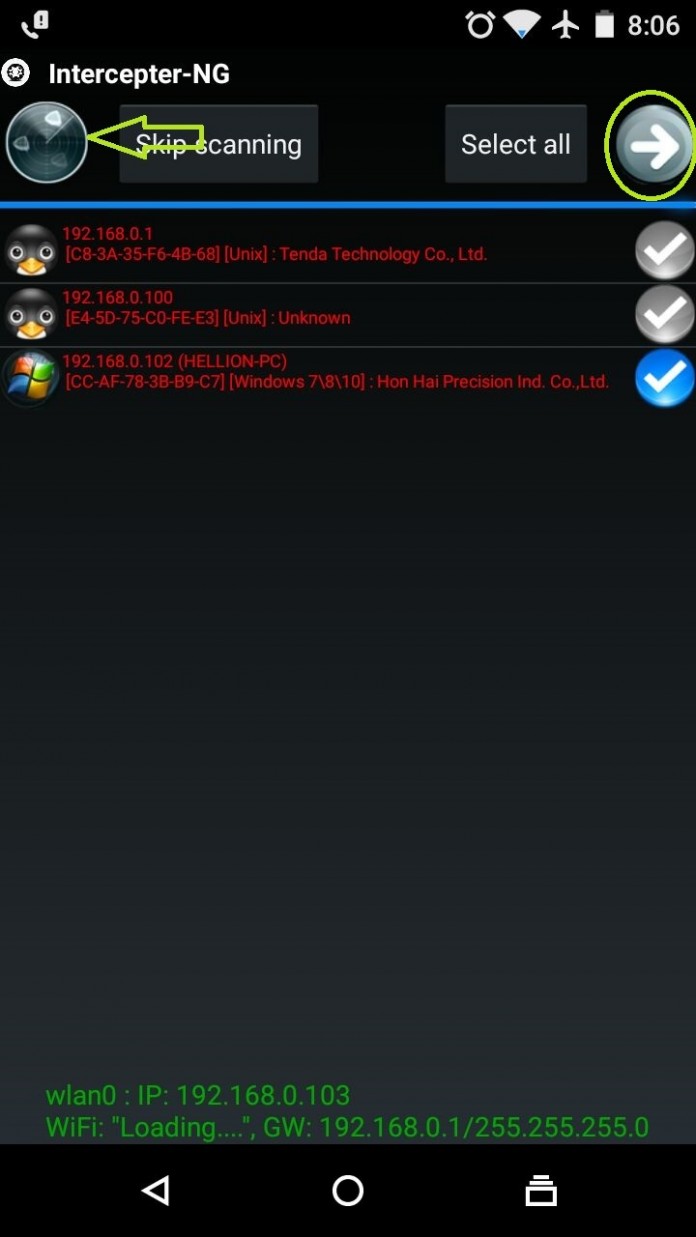
  • Once inside the app, Tap on the ” Radar” on top left corner to start scanning all the connected devices in the network.

  • After scanning it will show up a list of all connected devices (tap any device you want to hijack and Hit The Arrow on top right)


Scan Devices, Select Device, Hit The Arrow


On the next screen you will see a “Settings Gear” on top right, tap it and tick “Ressurection” and “SSL Strip” (as shown in the image down below)


settings menu


Tap The Nuclear Icon on top left and hit “Play Triangle” Beneath it (This Will Initiate Interception)


initializing the interception


Now Hit The “Shark Fin Icon” on the right of Nuclear icon, inside it Tap the “Play Triangle” To Start Capturing The Data Packets.


start capturing data packets


Let’s Hunt For Session Cookies Now.


Now we are all set to start cookie capturing, For the demonstration purpose, I will show it to you by stealing a session cookie from my Windows PC to Android.
Okay so now I will login into my account in a website in my Windows PC and let’s see how does that work.


Now Head Over To The Globe Icon in Interceptor-NG, there you will the list of captured cookies.. Hit on the Web Link (near the IP Address) to break inside the account using session key.


captured session cookies


Once You have tap on the web link, an in-app web browser will open up and you will be logged in into the victim’s account. 

【PART 2】Get Netflix Premium Account For Free With Android With Username & Password [Unlimited Account] 

I will let you know a simple trick with My Airtel App from Google Play store to get Netflix premium account for free without use of r...